
Get started · The family
How it works
agent → Lock client → socket → Lock → masked ticket → hub →
lox run→ signed decision → Lock → agent
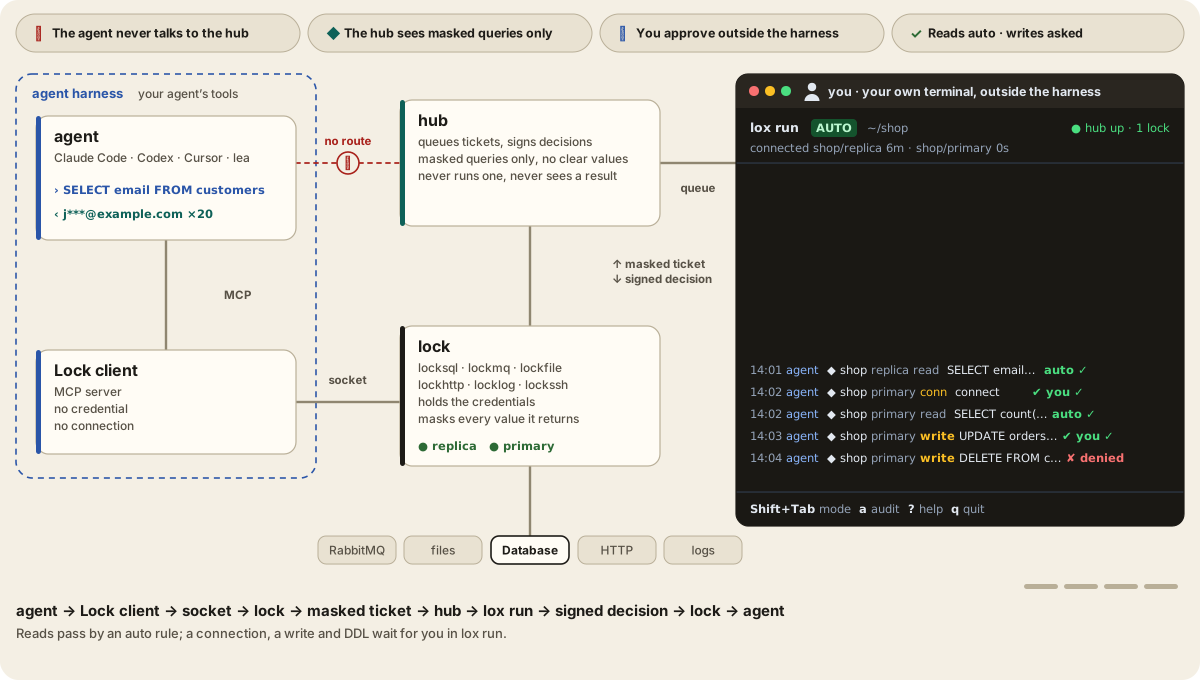
An agent harness is the program that runs a model as an agent and hands it tools. Harness security is the layer around it: it holds whatever the model is talked into, because every approval is answered outside the harness.
- The agent's Lock client is an MCP server with no credential and no connection. It passes each request over a socket to the Lock.
- The Lock checks and masks the request, runs nothing yet, and sends the hub a ticket with the masked screen.
lox rundecides it, by an auto rule or by asking you. The hub signs the decision, bound to the exact plan, and the Lock runs only on it.
What ships in lox run today:
- Auto mode by default. Reads are approved by rule, writes and DDL are asked every time, a connection once per profile per session, a new lockhttp endpoint once per session.
- Auto rules per profile in locksql and lockmq (
auto,askordenyper action); a looser rule is a reviewed policy loosening. - Key rotation and hub pinning.
lox run --rotate hub|INSTANCE|allreplaces a key;lox run --pin sha256:…sets the hub image by digest.