
Locks · locksql
locksql
Let any AI agent query your SQL databases: personal data comes back masked,
connections and writes wait for you, and the agent never holds a password.
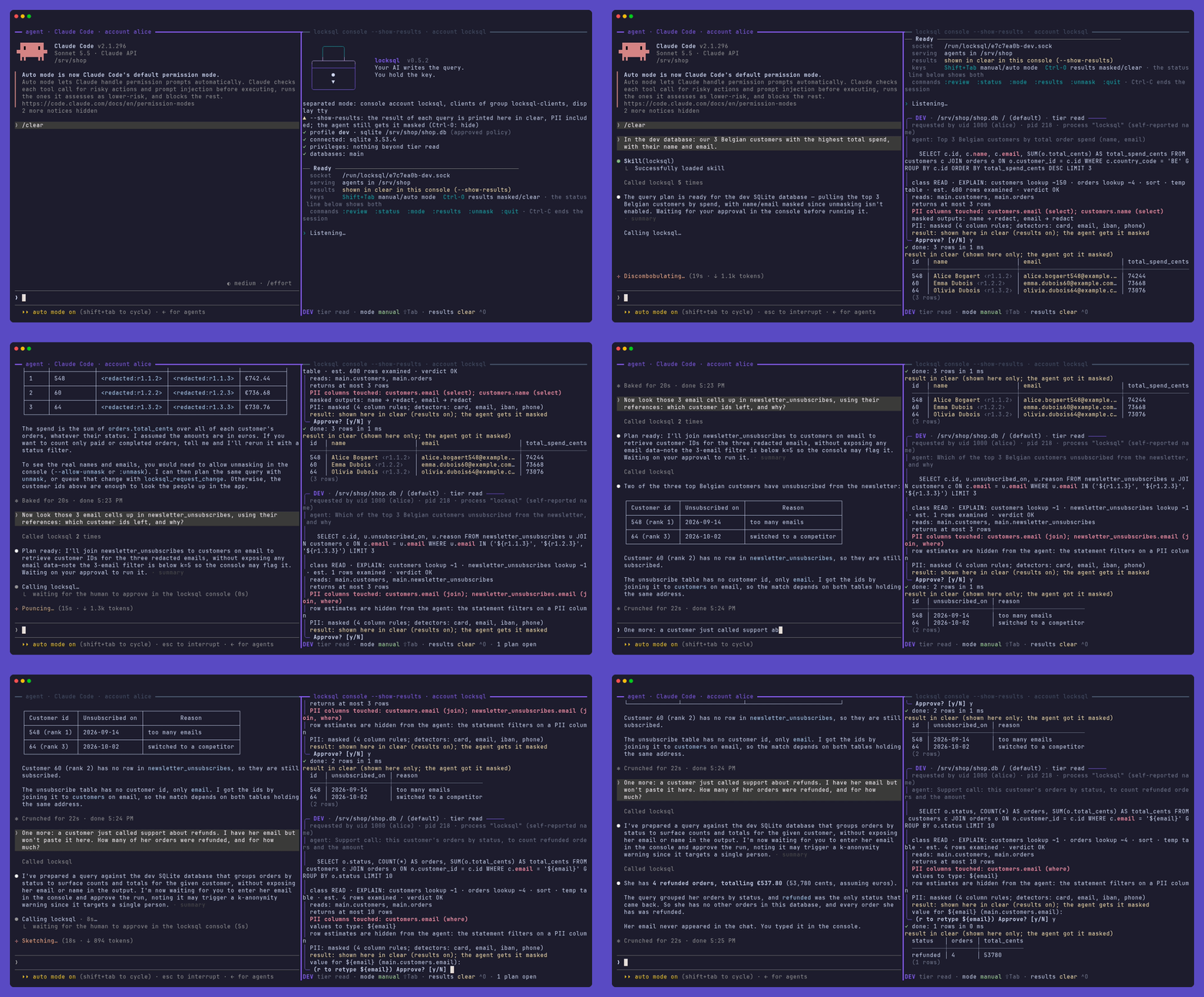
An agent (here Claude Code, left) and the locksql console (right). Recorded before approvals moved to lockhub: today you answer in lox run, and masked cells come back as plain <redacted>.
locksql is a Lock of the Lock Family, harness security for AI agents. A console sits between your agent and MariaDB, MySQL, PostgreSQL or SQLite: it holds the credentials, weighs every statement and masks personal data. The agent only asks.
Note
Pre-release (v0.17.x): a release may still change the config files,
the MCP tools or the CLI. See the path to 1.0.
Why locksql #
- The agent never holds a password. Credentials are typed at console start or read from Vault, in an account and a container the agent cannot reach.
- Approval outside the agent. Each statement becomes a ticket on
lockhub, decided in
lox run. Reads pass on your rules; connections, writes and schema changes wait for you. - Personal data stays masked. Every output column is traced to its source column and masked there, whatever the query calls it.
- Fail closed. What the classifier cannot classify with certainty is refused, with a code the agent can act on.
In-agent approval is a convenience; a separate approval process is a boundary.
Install #
brew trust davidgodefroid/tap
brew install davidgodefroid/tap/lox davidgodefroid/tap/locksql
locksql runs in Docker: Homebrew installs the locksql launcher, which runs
every command in the release's image. lox is lockhub's CLI. The whole
family instead: brew install davidgodefroid/tap/lockfamily.
Without Homebrew, the signed install script of a release:
V=vX.Y.Z
curl -fsSLO "https://raw.githubusercontent.com/DavidGodefroid/locksql/$V/scripts/install.sh"
less install.sh
LOCKSQL_VERSION=$V sh install.sh
Linux and macOS; on Windows, WSL 2 with Docker Desktop. Launcher, image, Vault image, lea and building from source: docs/install.md.
Quick start #
-
In your project, add the database.
lox addasks where it is (never the password), writes the profile, wires your agent and starts the console:lox add locksql -
In a terminal of its own, outside any agent, keep
lox runopen. Every ticket shows up there:lox run -
Start your agent in the project (
claude,codex,gemini, …) and ask: "how many orders were placed yesterday?"
lox add wires Claude Code; for Codex, Cursor or Gemini CLI, also run
locksql init codex (or cursor, gemini). With
lea, run lox add in lea's projects
directory, then lea stop and lea. Step by step, by hand:
docs/install.md.
Highlights #
|
🔑 One key holder |
👤 Your rules, your decisions |
|
🕶️ PII masked at the source |
⚖️ Weighed before it runs |
More: OS separation, grants, writes, remote databases, and the console's switches.
How it works #
Two processes in two containers. Only the console holds the key.
sequenceDiagram
    autonumber
    participant A as 🤖 AI agent<br/>(locksql mcp / CLI)
    participant C as 🔐 locksql console
    participant L as 🎫 lockhub (lox run)
    participant D as 🗄️ Database
    A->>C: plan "SELECT … LIMIT 20"
    C->>D: EXPLAIN
    C-->>A: plan id + verdict (OK / WARN / REFUSE)
    A->>C: run PLAN_ID
    C->>L: ticket, every literal masked
    C-->>A: pending, ticket T
    L-->>C: signed decision (your rule, or you)
    A->>C: run T
    C->>D: the statement
    C-->>A: masked, capped rows (untrusted data)
- The agent plans a statement (
locksql plan, or thelocksql_planMCP tool). The console classifies it, traces every output column, runsEXPLAINand answers with a verdict. - The agent runs the plan. The console sends lockhub a ticket and answers
pending. lox rundecides, on your profile's rules or by asking you. The console checks the signed decision, runs the statement, masks and caps the rows.
Engines: MariaDB 10.1+, MySQL 8.0+, PostgreSQL 13+, SQLite 3, all pure Go, on amd64 and arm64. The approval screen, the process layout and the engines table: docs/architecture.md.