
Locks · locklog
locklog
Let any AI agent investigate your logs: counts, patterns and traces come back
with emails, IPs and secrets masked, and a value in clear waits for you.
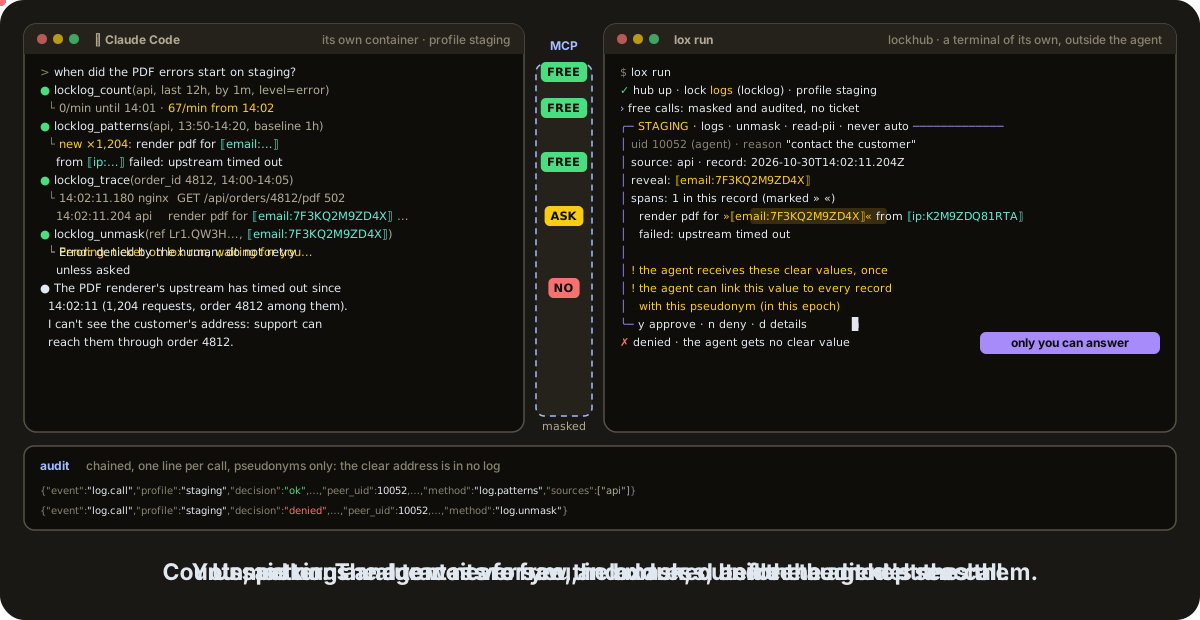
An agent (here Claude Code, left) and lox run (right, outside the agent): free calls come back masked, an unmask waits for you.
locklog is a Lock of the Lock Family, harness security for AI agents. A console held by a human reads your logs; the agent asks over MCP and gets masked, bounded, typed answers: counts, patterns, traces, lines around a hit.
Note
Pre-release (v0.3.x). The console is started by lox run only,
from lockhub v0.10.0. See the install status.
Why locklog #
- Masked before the model. Emails, IPs, card numbers, national ids and
the other values locklog detects become pseudonyms
(
⟦email:7F3KQ2M9ZD4X⟧); secrets become⟦secret⟧. - The agent never holds the logs. It never reads files, the Docker socket or a backend's credentials: the console does, in its own account and container.
- Approval outside the agent. Reads within budgets are free. A scan
beyond a budget or a value in clear is a ticket that waits for you in
lox run, and unmask is off by default on production. - Read-only. No write path to any log or backend, and every call is audited without clear values.
Install #
brew trust davidgodefroid/tap
brew install davidgodefroid/tap/lockfamily
That installs the Lock Family, locklog included. For locklog alone:
brew install davidgodefroid/tap/locklog (with lox for lox add locklog
and lox run), or the signed install script, which installs the launcher:
curl -fsSL https://locklog.dev/install.sh | sh
A Linux host with the logs, Docker ≥ 19.03 and cosign. Status, the script read first, and production placement: docs/install.md.
Quick start #
On a non-production profile first (a host agent runs on your own account, where it could still read the logs directly):
-
In your project, add the lock.
lox addbuilds a profile from the logs this host has (never a secret), wires your agent and checks the setup:cd ~/projects/shop lox add locklog -
In a terminal of its own, outside any agent, keep
lox runopen. It starts the console, and every ticket shows up there:lox run -
Start your agent in the project (
claude,codex,gemini, …) and ask: "when did the 502s start?"
lox add wires Claude Code; for Codex, Cursor or Gemini CLI, also run
locklog init codex (or cursor, gemini). On production, run the agent
in lea or in its own container
(docs/setup.md).
Highlights #
|
🕶️ Masked by construction |
🔎 Investigation tools, not a query language |
|
⚖️ Free within budgets, approved beyond |
📚 Your sources |
More: the highlights in full and a comparison.
How it works #
 host (you)
   lox run (lockhub): the hub and the decisions, in a terminal of its own
     └─ console container   uid 10051, no capability, read-only root,
          read-only binds of the approved log directories,
          pseudonym keys, index and audit in its own volume
 agent (lea, your own container, or the host for the trial)
   MCP server `locklog mcp` → the console's socket (peer uid checked by the kernel)
- The console reads the approved sources, and only those.
- Each call gets a byte plan from the time range and trusted selectors only; admission and stopping points never depend on what matched.
- Every record is masked first; then the agent's predicates run on the masked view.
- The answer leaves capped, as JSON under an "untrusted content" header.
Reads within budgets are free and audited. A scan beyond a budget, an
unmask or an approved lookup is a ticket at lox run; a profile's auto
rules (auto, ask, deny) decide which lox run may approve alone, and
the default asks you. The full layout, the decision table, the sources and
the masking benchmark: docs/architecture.md.