
Locks · lockssh
lockssh
Let your AI agent run commands on your servers
without ever handing it the SSH key.
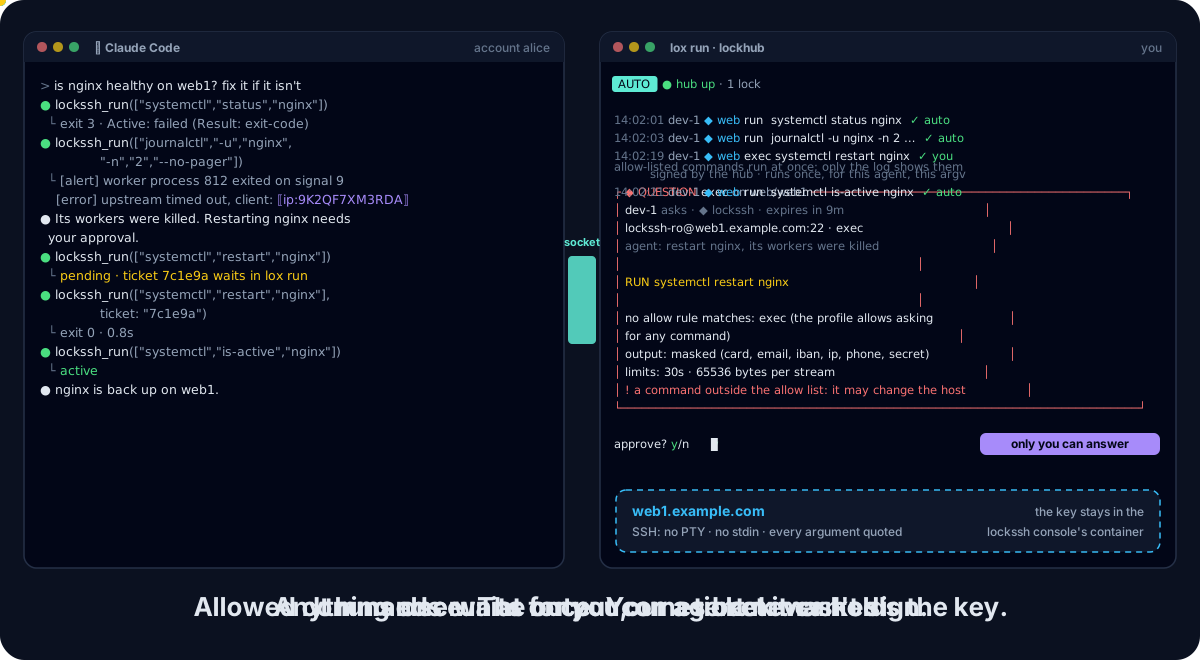
lockssh is a Lock of the Lock Family, harness security for AI agents. Allow-listed commands run at once, the rest waits for you, and the SSH key never leaves the console.
It works with any MCP client (Claude Code, Codex, Cursor, Gemini CLI, …) or
through the lockssh CLI.
Note
0.x: flags and the policy format may still change between minor versions. v0.2.0 is the latest release. lox add lockssh and lox run
serving it ship in lockhub v0.11.0
(lockhub#133); an
older lox does not know lockssh.
Why lockssh #
- Your agent can do the routine checks: a service's status, recent logs, the disk.
- It never holds the key or the password. A console in its own account and container holds them, and the only SSH connection.
- Only the commands you allowed run without asking you, and the agent's arguments can never inject shell syntax.
- Personal values and secrets are masked before the model sees them, and every command is audited, without its output.
Install #
lockssh runs in Docker. With Homebrew (Linux or macOS):
brew trust davidgodefroid/tap
brew install davidgodefroid/tap/lockssh
The formula installs the lockssh launcher and pins the release images by
digest, checked with cosign when the formula was bumped. Upgrade with
brew upgrade lockssh, not lockssh update. The lockfamily meta formula
installs the whole family, lockssh included, with lockhub's lox v0.11.0:
brew install davidgodefroid/tap/lockfamily
Without Homebrew, download the install script from the release you install, read it, then run it with that release:
V=vX.Y.Z
curl -fsSLO "https://raw.githubusercontent.com/DavidGodefroid/lockssh/$V/scripts/install.sh"
less install.sh
LOCKSSH_VERSION=$V sh install.sh
It checks the release's cosign signatures and installs the lockssh
launcher, which runs every command in the signed image
ghcr.io/davidgodefroid/lockssh:X.Y.Z, by digest.
lockssh versionprints the launcher's and the image's versions;lockssh updateupdates both.- The release's
-vaultimage adds the pinned Vault CLI forcredentials = "vault"(LOCKSSH_VAULT=1). - Your own build, Windows (WSL 2) and migrating from a host install: docs/docker.md.
Quick start #
It takes lockhub's lox v0.11.0 or later, the first that knows
the lockssh lock type
(lockhub#133): the
console runs hub-attached only, and an older lox cannot start it.
-
In your project, write a
lockfamily.yamlwith the hub alone (once):lox init -
Add an SSH host, guided and applied at once (host, port, login, key file in the lock's home, allow rules; never a secret):
lox add locksshIt pins lockssh v0.2.0, runs
lockssh profile add,lockssh init claudeandlockssh doctorfor you, declares the lock inlockfamily.yaml, offers to copy your key into the console's home, and shows the lock's review as it starts. Another agent:lockssh init codex,lockssh init cursororlockssh init gemini. -
Keep
lox runopen in a terminal of its own: it starts the console with its hub and serves the decisions.lox run -
Ask your agent: "Is nginx running on web1? Show the last errors." It calls
lockssh_status, thenlockssh_runwith["systemctl", "status", "nginx"]and["journalctl", "-u", "nginx", "-n", "50", "--no-pager"].
A profile, in .lockssh/config.toml:
[profiles.web]
host  = "web1.example.com"
user  = "lockssh-ro"
key   = "~/.ssh/id_ed25519"          # in the console account, never the agent's
allow = ["uptime", "df -h", "systemctl status *", "journalctl -u * -n * --no-pager"]
Highlights #
|
🔑 One key holder |
✅ Allow rules, no prompt |
|
👤 The rest, approved |
🚫 No shell, masked output |
How it works #
lox runstarts the console in its own container, as thelocksshaccount, with an egress to the profile's host only (lockhub v0.11.0 or later, lockhub#133). It shows the profile's policy for approval, logs in over SSH (trusting the host key only on your answer), and checks the account.- The agent's
lockssh mcp(or CLI) runs as another account and reaches the console only through its socket. - Each request is an argv, matched against the approved allow rules:
- a match runs at once;
- anything else is refused, or becomes a signed ticket on lockhub that you
decide with
lox approve, the lea deck or a paired phone.
- The console runs the command in an SSH session of its own (no PTY, no stdin), bounded in time and output. It masks stdout and stderr, and audits the request.
What the agent gets #
lockssh_run with ["journalctl", "-u", "nginx", "-n", "2", "--no-pager"]:
{
  "command": "journalctl -u nginx -n 2 --no-pager",
  "rule": "journalctl -u * -n * --no-pager",
  "action": "run",
  "exit_status": 0,
  "stdout": "[alert] worker process 812 exited on signal 9\n[error] upstream timed out, client: ⟦ip:9K2QF7XM3RDA⟧\n",
  "stderr": "",
  "duration_ms": 41,
  "masked": {"ip": 1}
}
The same value gets the same pseudonym for the whole console run, so the agent can still correlate; the next run draws new ones.
Clear output needs your switch in the console and a decided ticket, never an auto rule.