
Locks · lockfile
lockfile
Let any AI agent ask yes/no questions about a file it must never read:
signed, sandboxed plugins answer, and the agent only ever gets 1s and 0s.
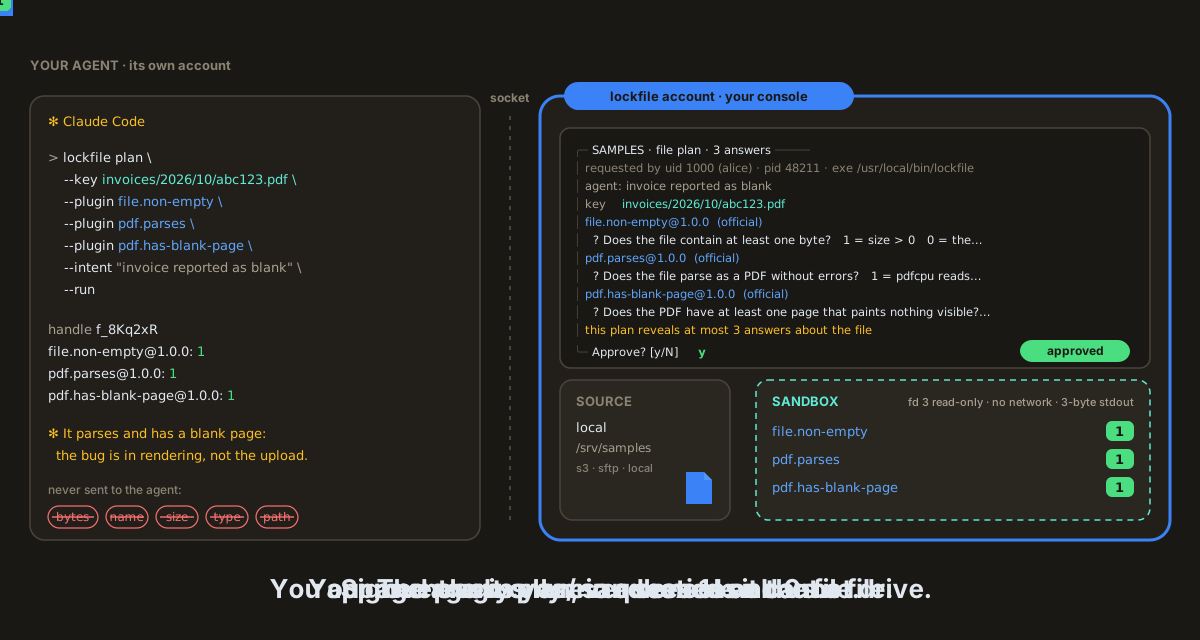
An agent (here Claude Code, left) and the lockfile console (right). Drawn before approvals moved to lockhub: today you approve the plan in lox run.
lockfile is a Lock of the Lock Family, harness security for AI agents. A console sits between your agent and the files in S3, on SFTP or in a local directory: it fetches the file, runs signed, sandboxed plugins on it, and returns only each plugin's answer. The agent only asks.
Note
Pre-release (v0.8.x): a release may still change the config files,
the MCP tools or the CLI. Linux only: the plugin sandbox needs Landlock and seccomp.
Why lockfile #
- The agent never reads the file. No byte, name, size, type, path or
listing reaches it:
1,0or no answer, from a closed list. - Approval outside the agent. Each plan becomes a ticket on
lockhub, and every lockfile plan
waits for your answer in
lox run. - Fixed, signed questions. Each plugin answers one question from its signed manifest, with no parameters to aim the bit at the content.
- The code that reads the file is boxed. Landlock, seccomp and rlimits: no network, no path, stdout capped at 3 bytes.
Some files must not reach a model: invoices, contracts, medical letters. lockfile answers the one question an agent needs about them, and nothing else.
Install #
brew trust davidgodefroid/tap
brew install davidgodefroid/tap/lox davidgodefroid/tap/lockfile
lockfile runs in Docker, on Linux (the formula is Linux only; on Windows, WSL 2
with Docker Desktop). Homebrew installs the lockfile launcher, which runs
every command in the release's image. lox is lockhub's CLI. The whole
family instead: brew install davidgodefroid/tap/lockfamily.
Without Homebrew, the signed install script of a release (needs cosign):
V=vX.Y.Z
curl -fsSLO "https://raw.githubusercontent.com/DavidGodefroid/lockfile/$V/scripts/install.sh"
less install.sh
LOCKFILE_VERSION=$V sh install.sh
The launcher, its image, Vault, lea and building from source: docs/install.md and docs/docker.md.
Quick start #
-
In your project, add the file store.
lox addasks where it is (S3, SFTP or a local directory; never a secret), writes the profile, wires your agent and starts the console:lox add lockfile -
Install the plugins you want, then apply them at the console with
:review(filesis the lock's default name):lockfile plugin install file.non-empty@1.0.0 lockfile plugin install format.is-pdf@1.0.0 lox attach files -
In a terminal of its own, outside any agent, keep
lox runopen. Every plan shows up there:lox run -
Start your agent in the project (
claude,codex,gemini, …) and ask about a file by its exact key: "is invoices/2026/10/abc123.pdf a valid PDF?"
lox add wires Claude Code; for Codex, Cursor or Gemini CLI, also run
lockfile init codex (or cursor, gemini). With
lea, run lox add in lea's projects
directory, then lea stop and lea. Step by step, by hand:
docs/install.md.
Highlights #
|
🔢 Only 1s and 0s |
👤 Human in the loop |
|
🔏 cosign everywhere |
⏱️ Timing padded |
13 official plugins (empty file, PDF header, parses, truncated, blank pages, fonts, JavaScript, …): docs/plugins.md. Profiles and every key: docs/configuration.md.
How it works #
Two sides in two OS accounts. Only the console touches the file.
sequenceDiagram
    autonumber
    participant A as 🤖 AI agent<br/>(lockfile mcp / CLI)
    participant C as 🔐 lockfile console
    participant L as 🎫 lockhub (lox run)
    participant S as 🗄️ S3 / SFTP / disk
    participant P as 🧱 sandboxed plugins
    A->>C: plan --key K --plugin X --plugin Y
    C->>L: ticket: the key and the plugins' signed questions
    L-->>C: signed decision (you)
    C->>S: fetch K into a 0700 workspace
    C->>P: the file as a read-only fd 3
    P-->>C: 1 or 0 each, checked strictly
    C-->>A: one bit per plugin, on the answer quantum
- The agent picks plugins from
lockfile pluginsand plans with the exact key it was given. There is no listing and no stat. - The console validates the plan without touching the source and sends
lockhub a ticket; you answer it in
lox run. - The console fetches the file, runs each plugin in its own sandbox and returns the answers together, with a handle for follow-up questions.
The approval screen, the agent's commands and MCP tools, and exit codes: docs/architecture.md.