
Locks · lockhttp
lockhttp
Let any AI agent use the web: reads of trusted hosts pass,
anything that sends data or reaches an unknown host waits for you.
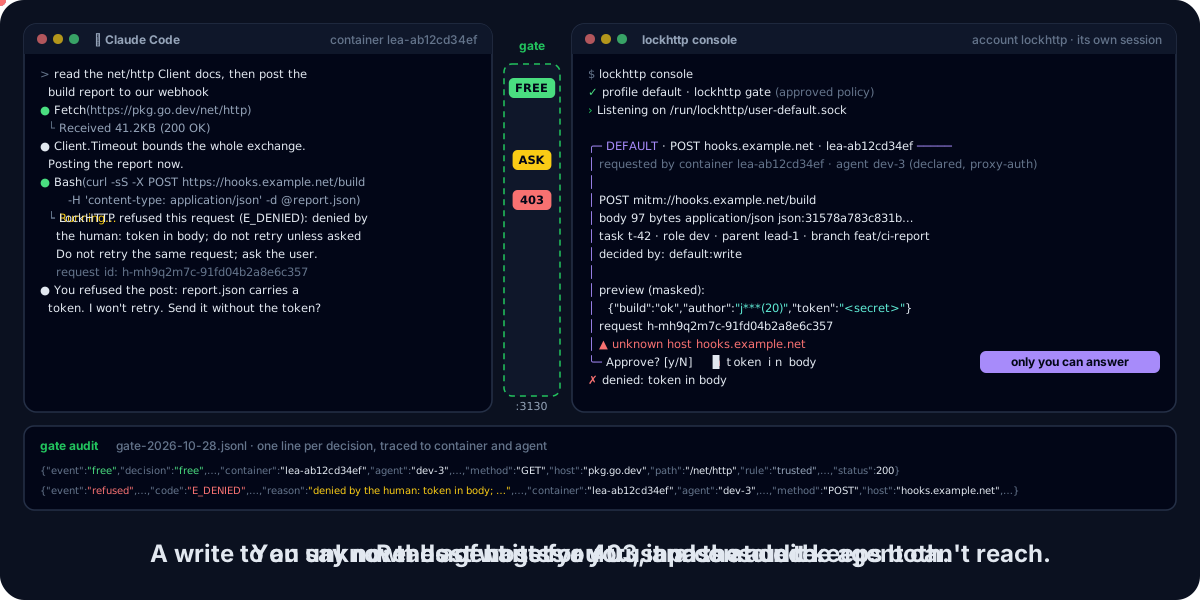
An agent (here Claude Code, left, in a lea container) and the approval screen (right). Drawn in the console's frame from before the hub: today you answer in lox run.
lockhttp is a Lock of the Lock Family, harness security for AI agents. It is the proxy every outbound HTTP(S) request of your agent goes through. Reads of hosts you trust pass; anything else waits for your approval on lockhub, where the agent cannot reach it.
Note
0.x: the policy format may still change between minor versions. Built on lockkit v0.14.1. Command names are fixed; flags may still move. Design decisions: docs/decisions.md.
Why lockhttp #
- Per request, not per domain. An allowlist lets a host's writes through with its reads. lockhttp keeps reads free and holds writes, uploads and unknown hosts for a human.
- Approval outside the agent. Each held request becomes a
NeverAutoticket on lockhub, answered by a human inlox run. Nothing in the agent's process can switch it off. - Credentials the agent never holds. The gate can inject an API token for one host and port; a credential sent to the wrong host is refused.
- Traced. Every decision is tied to the container, the agent and the session that asked.
In-agent approval is a convenience; a separate approval process is a boundary.
Install #
brew trust davidgodefroid/tap
brew install davidgodefroid/tap/lox davidgodefroid/tap/lockhttp
brew install davidgodefroid/tap/lea
lockhttp runs in Docker: Homebrew installs the lockhttp launcher, which runs
every command in the release's signed image. lox is lockhub's CLI, and the
gate runs inside lea. The whole
family instead: brew install davidgodefroid/tap/lockfamily.
Without Homebrew, the signed install script of a release:
V=vX.Y.Z
curl -fsSLO "https://raw.githubusercontent.com/DavidGodefroid/lockhttp/$V/scripts/install.sh"
less install.sh
LOCKHTTP_VERSION=$V sh install.sh
Linux and macOS; on Windows, WSL 2 with Docker Desktop. The launcher, its commands and the setup by hand: docs/install.md.
Quick start #
-
In lea's projects directory, add the lock.
lox add lockhttpasks only for its name, writes the policy and starts the console:cd ~/projects lox add lockhttp -
In a terminal of its own, outside lea and any agent, keep
lox runopen. Every held request shows up there:lox run -
Turn lockhttp on in lea's configuration, then restart lea.
LEA_LOCKHTTP=1 leais not enough: lea's configuration wins over the environment.echo LEA_LOCKHTTP=1 >> ~/.config/lea/lea.conf lea stop --all lealea-proxy and its gate are shared by every lea on the machine: lockhttp is on or off for all of them at once, and once it is on, a lea whose projects directory has no lockhttp lock does not start.
lea doctorreports the gate's state. -
Ask your agent to read the docs of a trusted site: it goes through. Ask it to post somewhere: the request waits for your
y.
lockhttp is a proxy, so it works with any agent and any HTTP client inside lea's containers (lea runs Claude Code today). The contract with lea: docs/lea.md.
Highlights #
|
👤 Never answered automatically |
🔑 Credentials injected |
|
🔁 LLM APIs checked as a relay |
🧱 Fail closed |
More: the verdicts, refusal codes and the Claude API rules, and the policy keys. A company bounds lockhttp with the Lock Family's managed configuration (lockhttp's section).
How it works #
Three pieces, each in a container of its own, and the hub.
 agent container (internal network only)
        │ HTTP(S)_PROXY
        ▼
 lockhttp gate  ── FREE ──▶ squid ──▶ Internet
        │ ASK                ▲
        ▼                    │ on y
 lockhub ── ticket ──▶ you, in lox run
        ·
 lockhttp console: serves the approved policy to the gate
- The agent's HTTP client sends every request to the gate. In lea the agent's container has no other route out.
- The gate decides each request with the policy the console serves it. It never reads a policy file.
- A free request goes out through squid. A request that needs a human is held (60 s by default) as a signed ticket on the hub.
- With a local CA and the signer, the gate decrypts HTTPS and decides
each request by method, path, headers and body. Without them, it decides
a
CONNECTat the domain only.
The full diagram, verdicts, refusal codes, the Claude API checks and the limits: docs/how-it-works.md.