
Locks · lockmq
lockmq
Let any AI agent inspect your RabbitMQ brokers: message contents come back masked,
connections and queue reads wait for you, and the agent never holds a password.
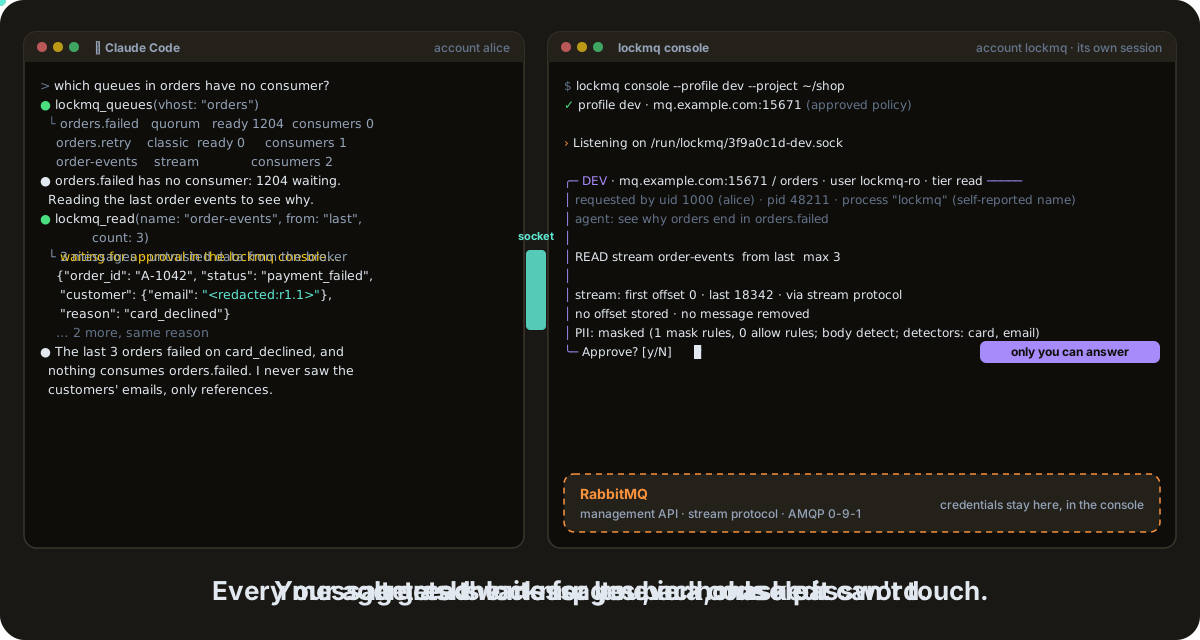
An agent (here Claude Code, left) and the lockmq console (right). Recorded before decisions moved to lockhub: today you answer in lox run, and stream reads pass on the default rules.
lockmq is a Lock of the Lock Family, harness security for AI agents. A console sits between your agent and RabbitMQ: it holds the broker credentials and the only broker connections, serves an allowlist of read operations and masks personal data in messages. The agent only asks.
Note
Pre-release (v0.8.x): a release may still change the config files,
the MCP tools or the CLI.
Why lockmq #
- The agent never holds a password. Credentials are typed at console start or read from Vault, in an account and a container the agent cannot reach.
- Approval outside the agent. Each message read becomes a ticket on
lockhub, decided in
lox run. Lists and stream reads pass on your rules; connections and queue peeks wait for you. - Personal data stays masked. Bodies, headers and properties are masked per field; on production every string no allow rule names is redacted.
- Nothing moves. Stream reads store no offset; there are no writes, and a queue peek (which requeues) exists only on a profile you allow.
Handing the agent rabbitmqctl or an admin password gives it every write
too, and every message body in clear. lockmq moves the key and the decision
out of the agent.
Install #
brew trust davidgodefroid/tap
brew install davidgodefroid/tap/lox davidgodefroid/tap/lockmq
lockmq runs in Docker: Homebrew installs the lockmq launcher, which runs
every command in the release's signed image. lox is lockhub's CLI. The
whole family instead: brew install davidgodefroid/tap/lockfamily.
Without Homebrew, the signed install script of a release:
V=vX.Y.Z
curl -fsSLO "https://raw.githubusercontent.com/DavidGodefroid/lockmq/$V/scripts/install.sh"
less install.sh
LOCKMQ_VERSION=$V sh install.sh
Linux and macOS, on amd64 and arm64 (CGO_ENABLED=0); on Windows, WSL 2
with Docker Desktop. Launcher, image, Vault image, lea and building from
source: docs/install.md.
Quick start #
-
In your project, add the broker.
lox addasks where it is (never the password), writes the profile, wires your agent and starts the console:lox add lockmq -
In a terminal of its own, outside any agent, keep
lox runopen. Every ticket shows up there:lox run -
Start your agent in the project (
claude,codex,gemini, …) and ask: "which queues have no consumer?"
lox add wires Claude Code; for Codex, Cursor or Gemini CLI, also run
lockmq init codex (or cursor, gemini). With
lea, run lox add in lea's projects
directory, then lea stop and lea. Step by step, by hand:
docs/install.md.
Highlights #
|
🔑 One key holder |
👤 Your rules, your decisions |
|
🕶️ Masking for messages |
🧪 Peek, only if you allow it |
More: the catalogue and the protocols, the safety model and its limits, and every profile key. A company bounds every profile of a machine with the family's managed configuration (lockmq's keys).
How it works #
Two processes in two containers. Only the console holds the key.
sequenceDiagram
    autonumber
    participant A as 🤖 AI agent<br/>(lockmq mcp / CLI)
    participant C as 🔐 lockmq console
    participant L as 🎫 lockhub (lox run)
    participant B as 🐇 RabbitMQ
    A->>C: lockmq_queues (catalogue)
    C->>B: GET /api/queues/{vhost}
    C-->>A: selected fields (untrusted data)
    A->>C: lockmq_read order-events from last
    C->>L: ticket, screen masked
    C-->>A: pending, ticket T
    L-->>C: signed decision (your rule, or you)
    A->>C: lockmq_read --ticket T
    C->>B: unnamed stream consumer, at most read_max
    C-->>A: masked, capped messages (untrusted data)
- The agent calls an MCP tool (
lockmq_queues,lockmq_read, …) or the CLI. The console checks the operation, the vhost, the tier and the arguments before any broker call. - Catalogue calls run at once. A read or a peek becomes a ticket on
lockhub, and the agent gets
pending; a ticket your profile's auto rules decide within a couple of seconds runs in the same call. lox rundecides, on your profile's rules or by asking you. The console checks the signed decision, reads, masks and caps the messages.
RabbitMQ 3.13 and 4.1, through the management API, the stream protocol and AMQP 0-9-1. The approval screen, the process layout and the protocols: docs/architecture.md.